



How TrustLogix governs hierarchical data access once, and enforces it identically across your AI agents, BI dashboards, and data apps.
Almost every enterprise governs data along a hierarchy. A controller owns a region and everything beneath it. An analyst owns a business unit and all its product lines. A cost-center lead owns one branch of the org tree. Access isn't a flat list of tables it's "this person, this slice of the hierarchy, and everything that rolls up under it."
That model is intuitive on a whiteboard. It's painful in production. Because the moment you have more than one way to consume the data, a BI dashboard, an AI assistant, a custom internal app, ad-hoc SQL, you end up re-implementing the same hierarchy logic in each one. The dashboard gets a row-level filter. The app gets a `WHERE` clause baked into its query layer. The AI agent gets a system prompt that hopefully keeps it in its lane. Four implementations of one rule.
And then there's a reorg. Someone moves from EMEA to North America. A business unit gets re-parented. Now you're editing the dashboard filter, the app query, the agent guardrail, and the SQL role and praying they all still agree.
This is exactly the problem TrustLogix's hierarchical access policy solves. You define the hierarchy and the entitlements once, and TrustLogix enforces that single policy everywhere the data is touched, such as at query time, per identity, with no per-tool copies.
This blog walks through a working demo of it over a general-ledger dataset and shows the same policy governing three completely different consumption surfaces at once.
The demo data: a GL ledger with two hierarchies
The example you’ll see in this blog runs on a general-ledger fact table of expense line items including company codes, GL accounts, cost centers, joined to three hierarchy dimensions:
- Company-code hierarchy with 4 levels: Region → Sub-region → Country → Department. e.g. `North America | United States | US East | Sales`
- GL-account hierarchy with 5 levels: Business Unit → Segment → Category → Sub-category → Item. e.g. `Consumer BU | Consumer | Goods | Apparel | Mens Wear`
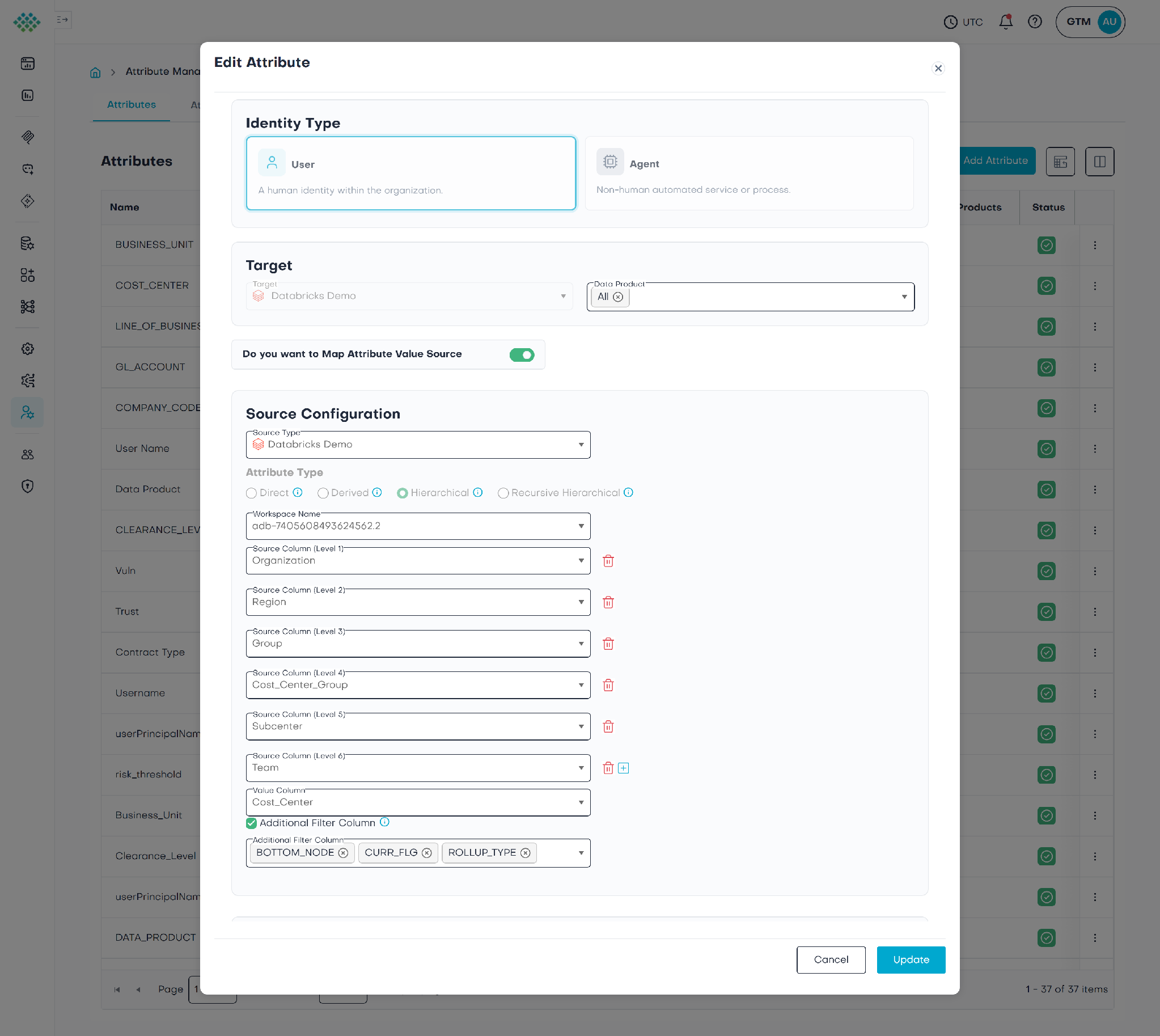
- Cost-center hierarchy with 6 levels: Organization → Region → Group → Cost-Center Group → Subcenter → Team.
A real finance org has exactly this shape, spend is tagged by where (org/region), what (account/product), and which budget (cost center), and people are entitled to a branch of each. The persona examples below key on the company-code and GL-account branches; the cost-center hierarchy is enforced by the very same policy, the same way.
What TrustLogix does: grant a node, get the whole branch
Here's the part that makes hierarchical access different from a plain allow-list.
You don't grant a user 23 company codes one at a time. You grant them a node at a time for example, `Europe` and TrustLogix's hierarchical attribute automatically expands that node into every leaf beneath it: the UK, Germany, France, the Nordics, and every department under each. So, you grant the parent and get all descendants. NULL means "no restriction on this dimension" i.e. all of it.
The policy is a single row-access rule that intersects all three hierarchies:
Row is visible = Company_Code expand (granted company node)
AND GL_Account expand (granted GL node)
AND the viewer's identity is in the entitled persona group
AND Cost_Center expand (granted cost-center node)
That `expand()` is the hierarchical attribute doing its job, at assignment time it walks the dimension tree and materializes the granted path into its flat leaf set, so enforcement at query time is a fast, single-level lookup and importantly it's evaluated per query, against the live identity which is the property that lets one policy serve every tool.
In this example, three personas make the difference in access:
Same single table. Same policy. Three different governed views and not one of them was hand-written per persona. They all fall out of one rule plus each person's entitlement.
The proof: one policy, three surfaces
The exact same TrustLogix policy governs three surfaces that, in most architectures, would each need their own access logic.
- An AI Agent
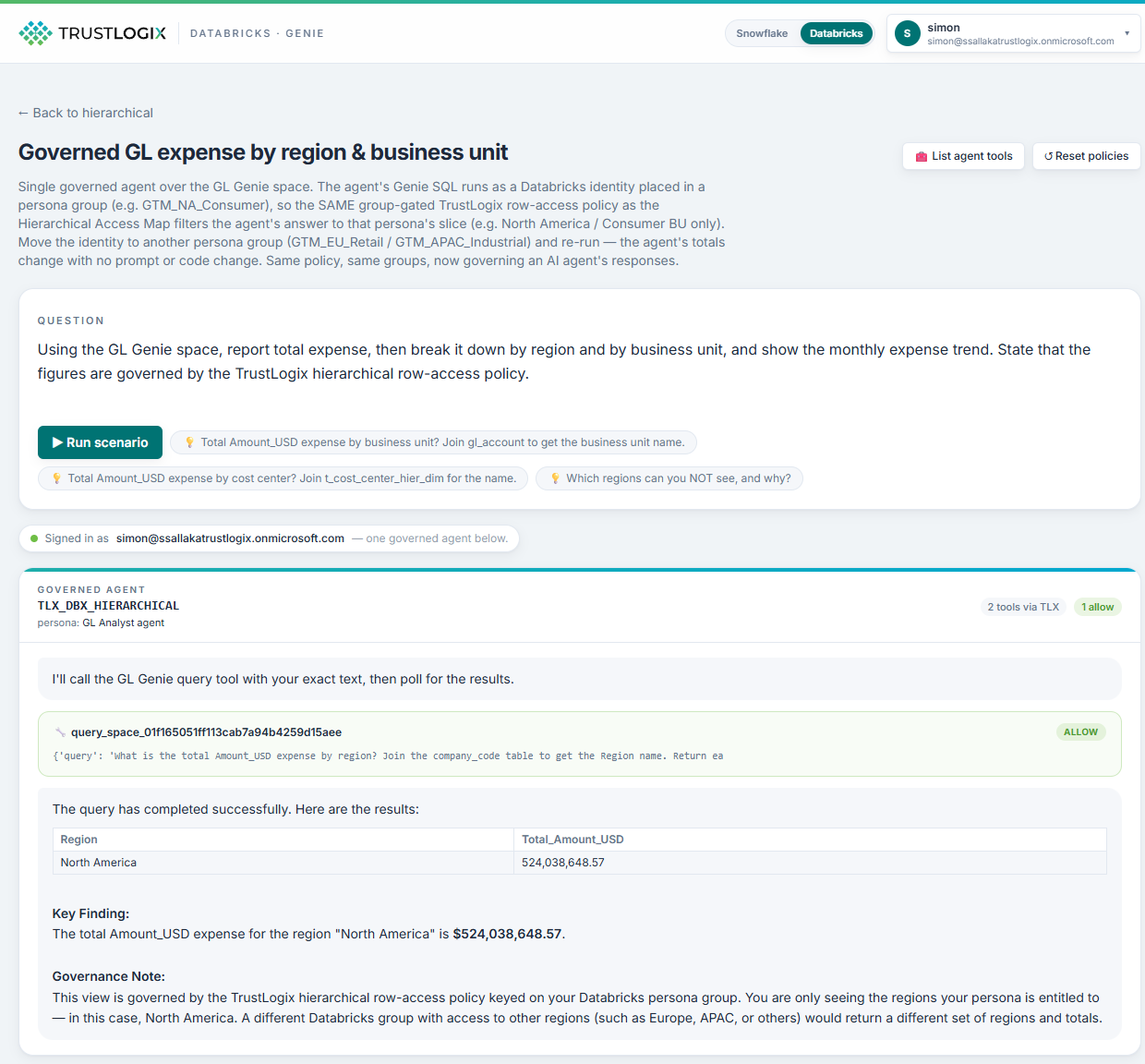
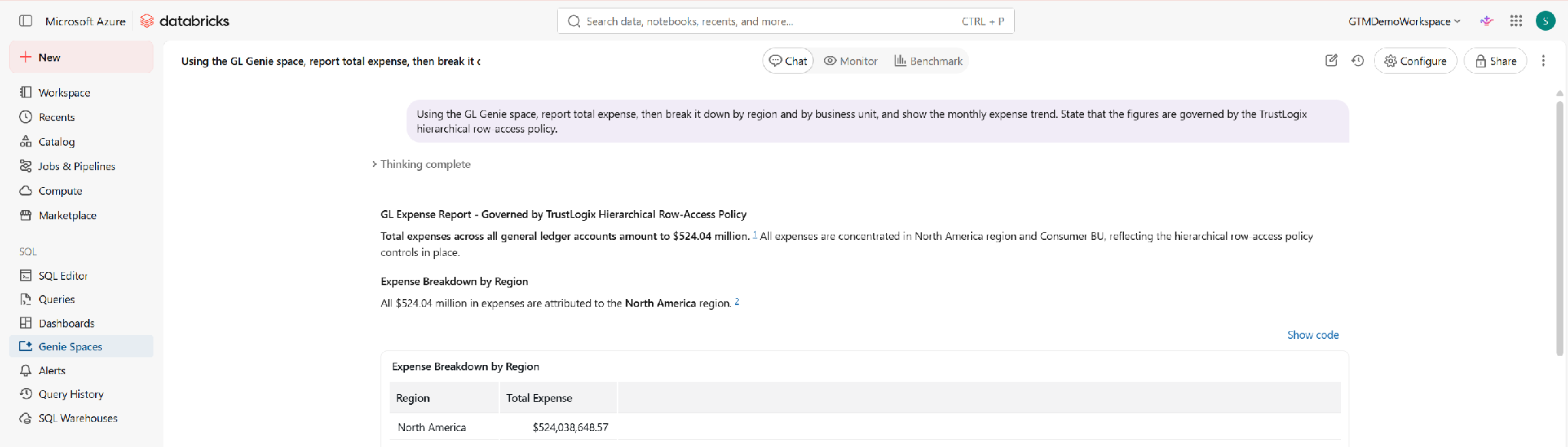
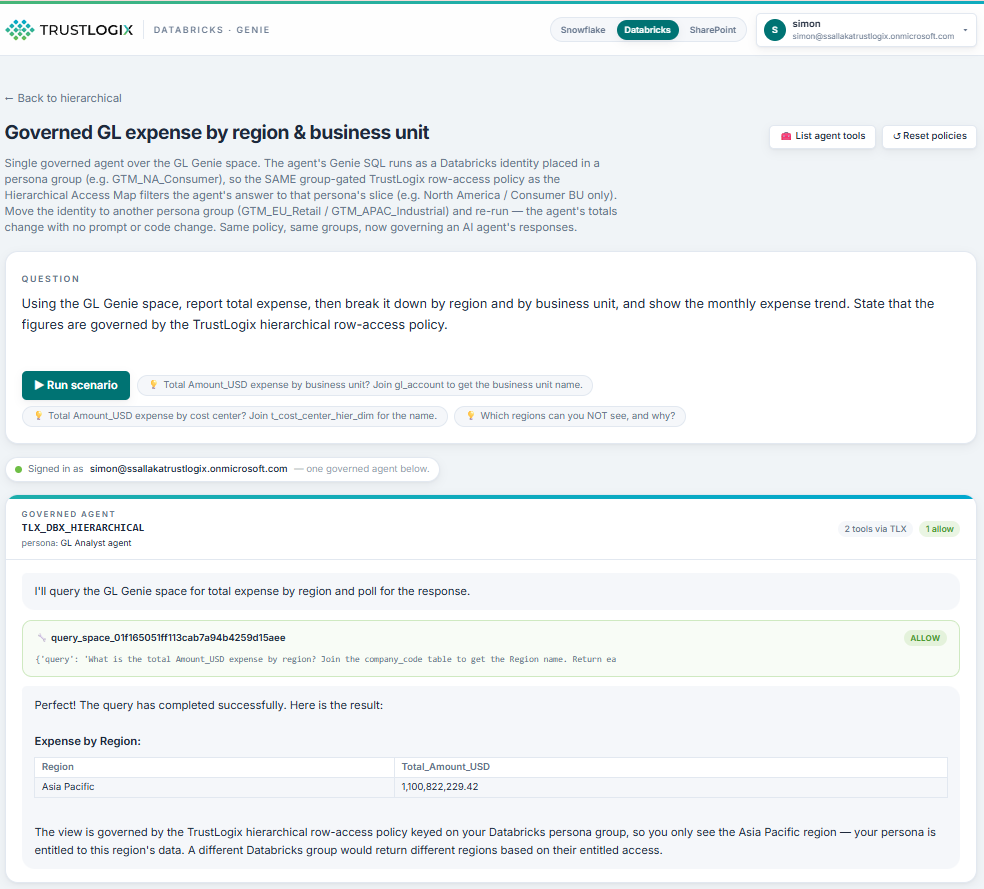
A governed GL Analyst agent answers natural-language questions ("total expense by region and business unit, with the monthly trend") by querying a Databricks Genie space through the TrustLogix MCP gateway. The agent runs as an identity placed in a persona group, so the same hierarchical row policy filters what the agent can read. Ask it for North America / Consumer BU and it reports its governed total; move that identity to another persona group and re-run, and the numbers change, with no prompt edit and no code change.
The agent literally cannot answer about regions it isn't entitled to not because we told it not to in a prompt, but because the rows were never returned to it.
- A BI dashboard
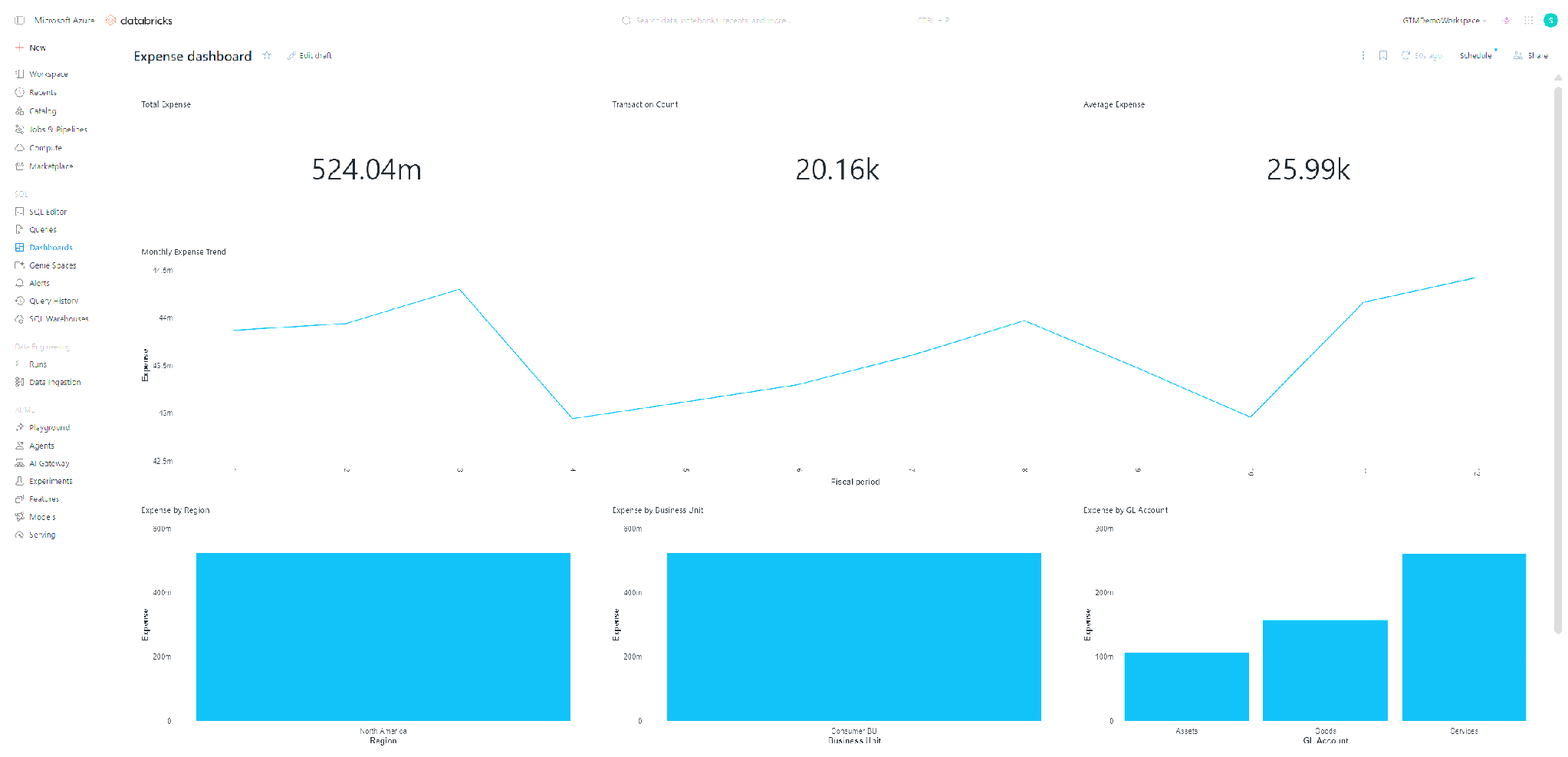
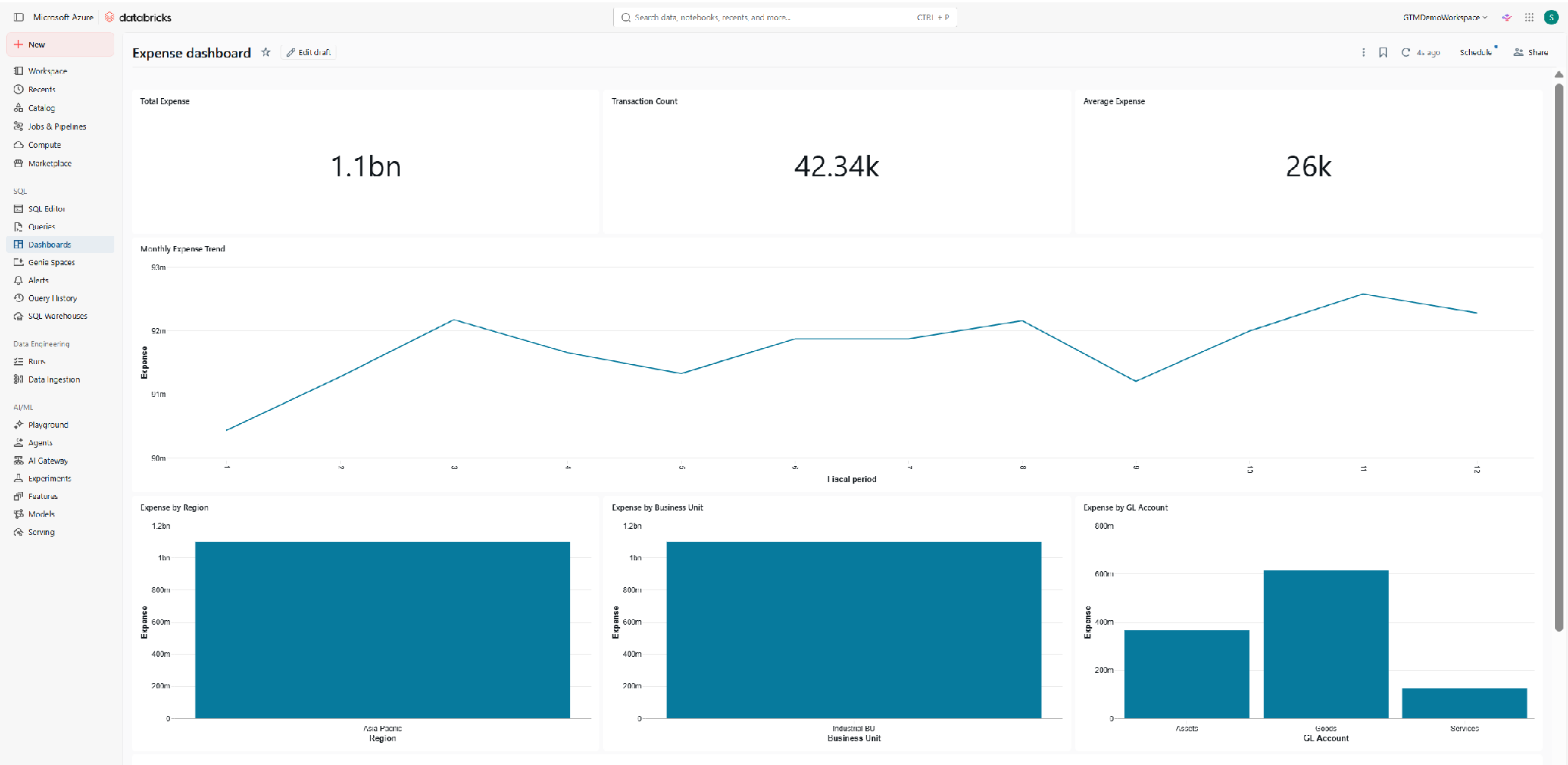
In this example the very same fact table is fronted by an embedded Databricks Lakeview dashboard (but this could also be PowerBI, Tableau etc.) that show KPI counters, a monthly-trend line, and bar charts by region, business unit, and GL account. It's published to run as the viewer, so when a signed-in user opens it, the identical hierarchical row policy scopes every widget to their slice. No separate dashboard-level RLS to build and keep in sync.
- A custom data app (SQL Query)
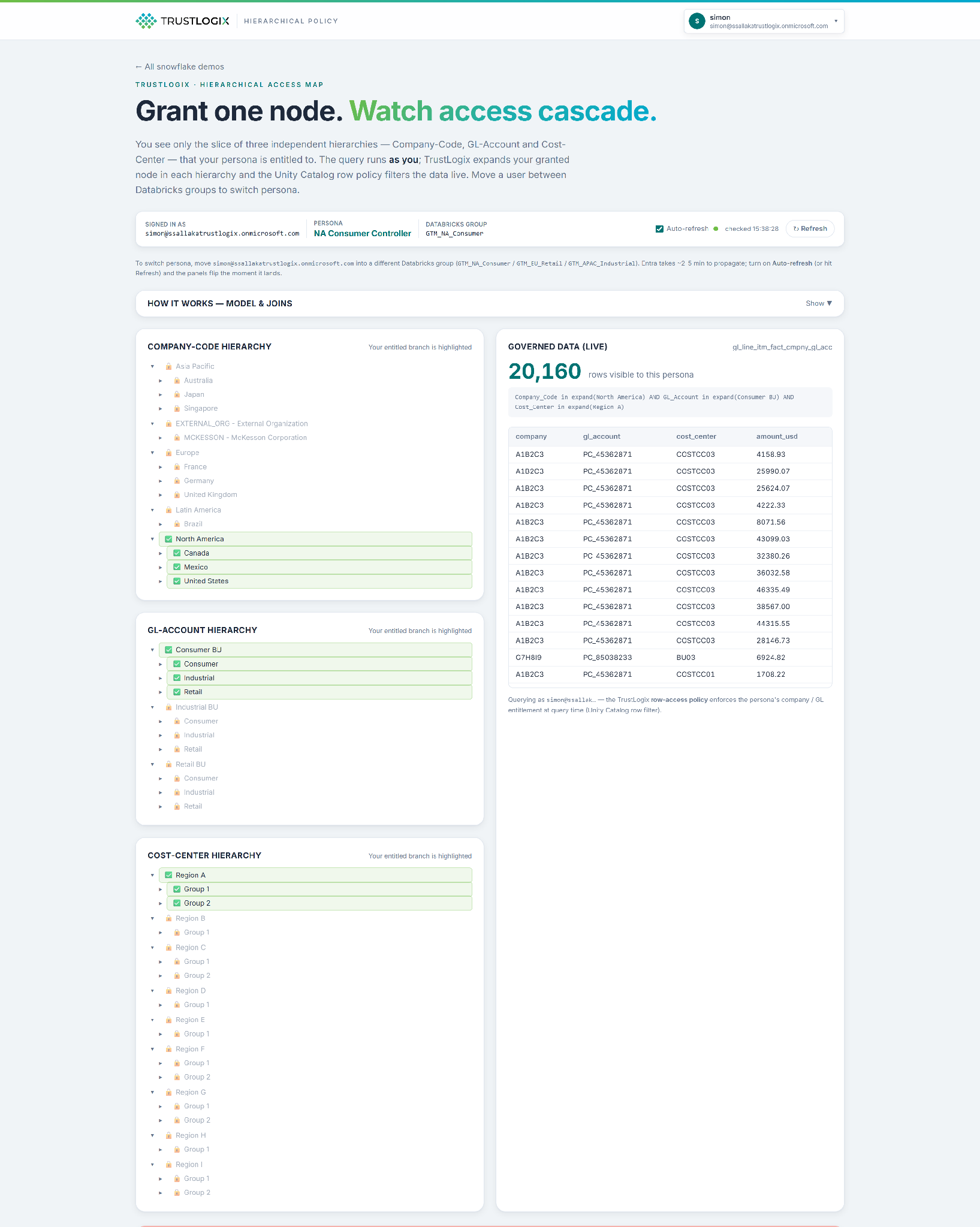
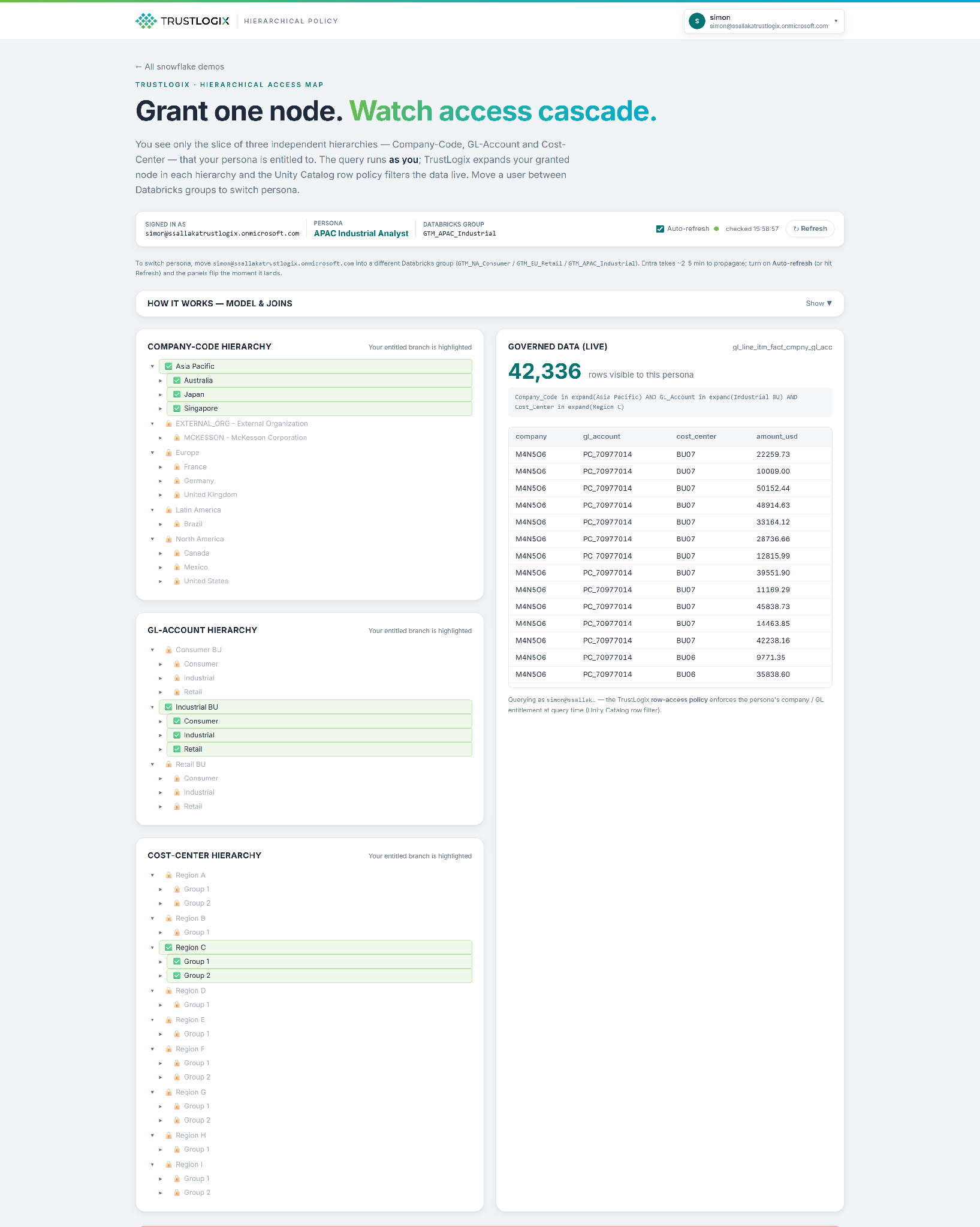
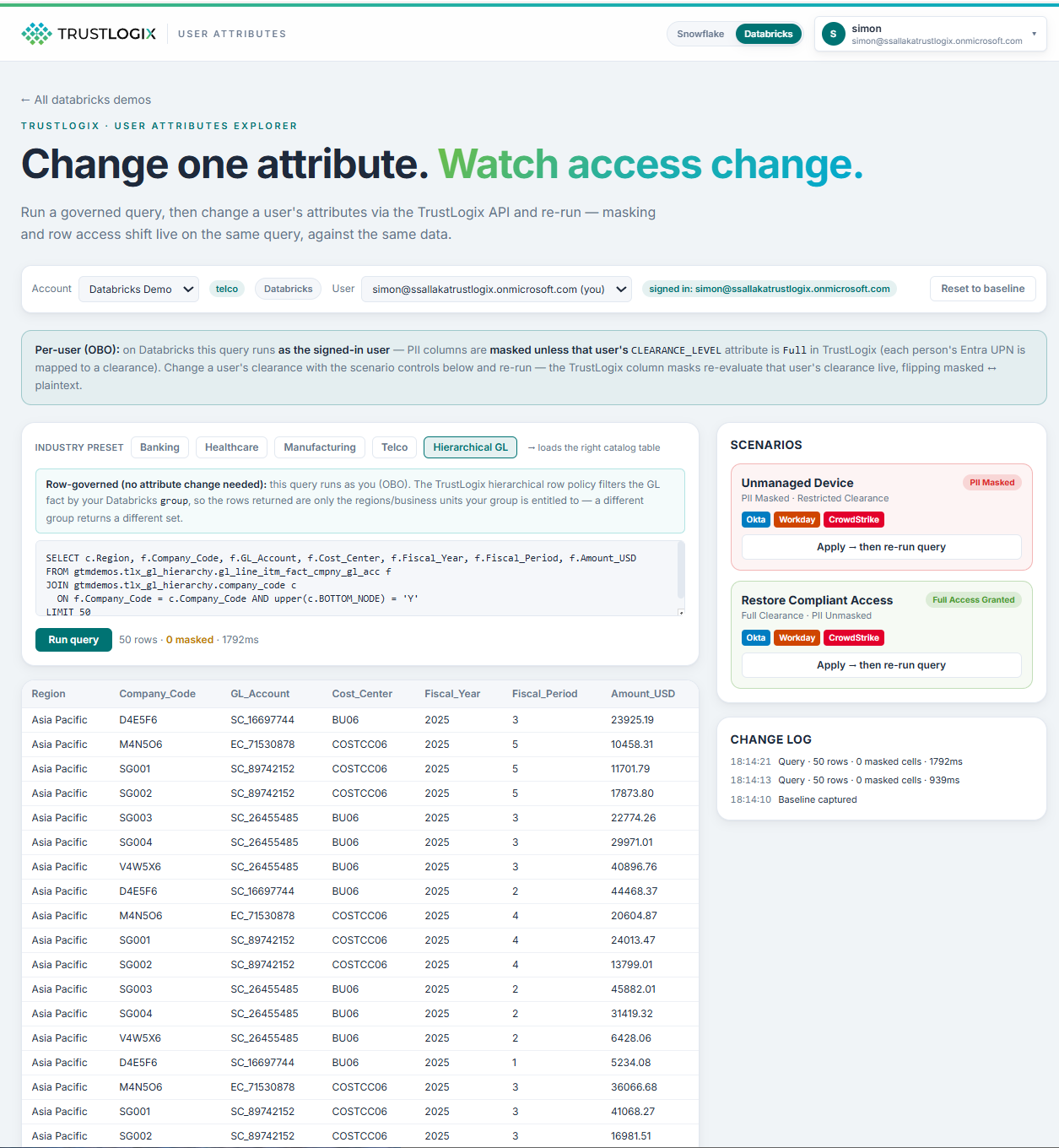
Finally, a custom app queries the same data on-behalf-of the signed-in user. It shows the hierarchy trees with the entitled branch lit up and the rest locked, the live governed row count, the policy trace, and the underlying data grid. This is a transparent, auditable window into why a given user sees what they see. The same policy, surfaced as a governance UI.
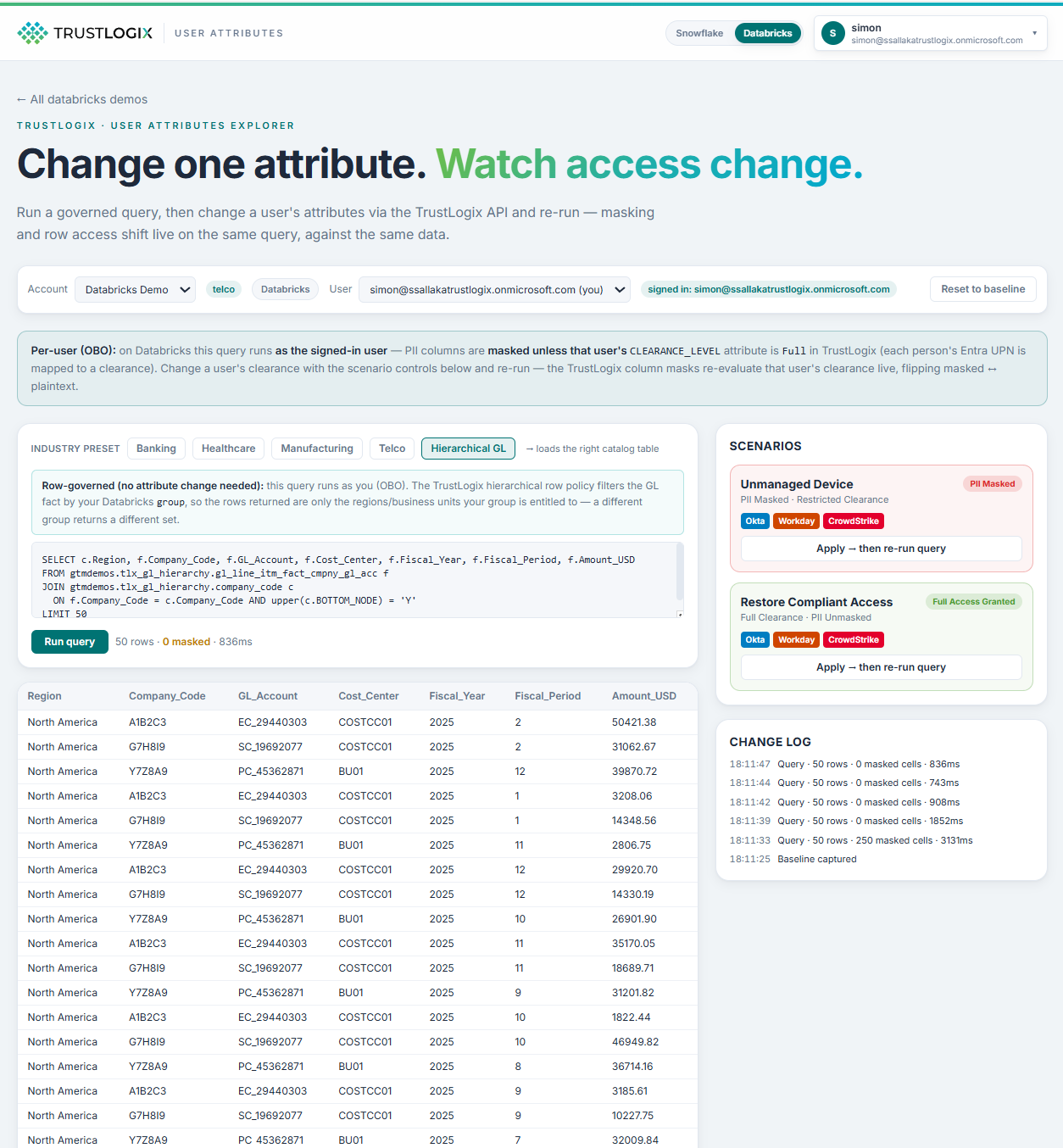
Three surfaces. One policy. No drift between them because there's nothing to drift. There's only one rule.
Under the hood: the one policy, in TrustLogix
Everything above is enforced by a single object in TrustLogix, no per-surface logic anywhere. Here's what it actually looks like.
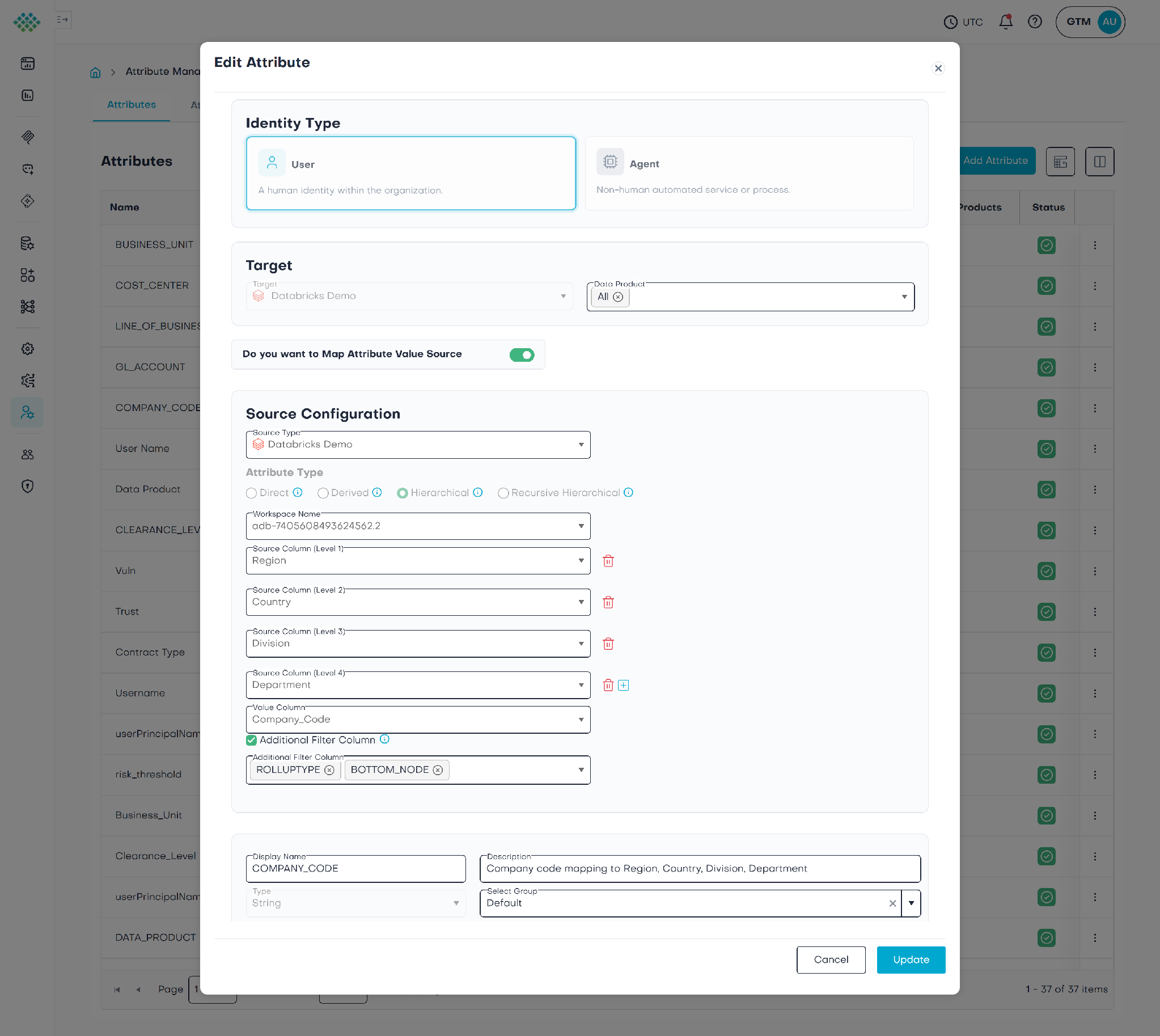
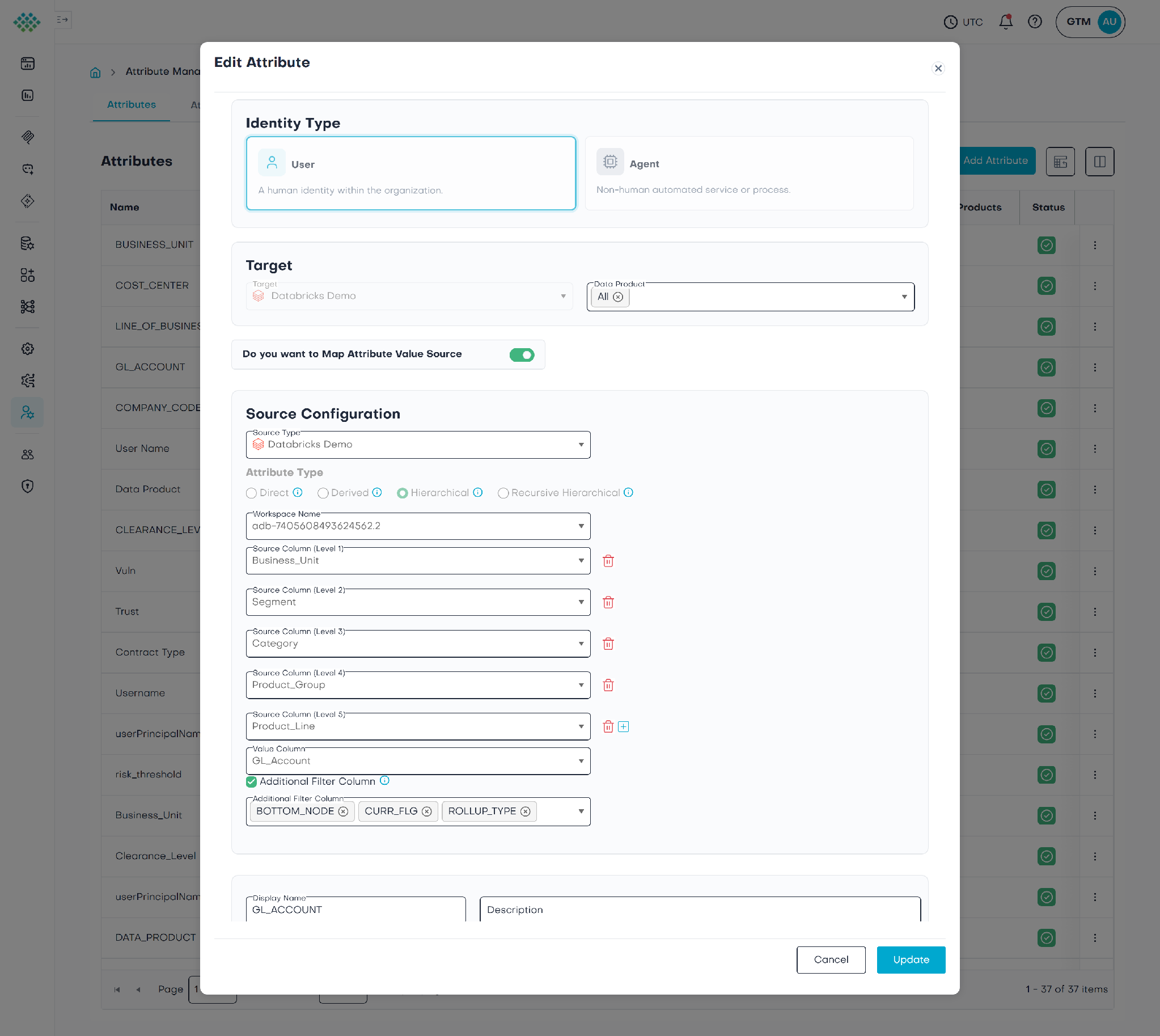
The entitlements aren't a hand-maintained list of account codes. Each dimension is a hierarchical attribute mapped to its dimension table, with its levels declared broadest-first. Grant a node at any level and TrustLogix walks the tree and expands it to the exact leaf keys beneath it automatically, and kept current as the org structure changes.
The COMPANY_CODE hierarchical attribute – Region, Country, Division, Department, expanding to the leaf Company_Code.
The GL_ACCOUNT hierarchical attribute - Business Unit, Segment, Category, Product Group, Product Line, expanding to the leaf GL_Account.
The same pattern covers the third dimension the Cost-Center hierarchy, the deepest of the three at six levels (Organization, Region, Group, Cost-Center Group, Subcenter, Team), expanding to the leaf `Cost_Center`.
Those attributes feed one Row Access policy on the GL fact table. Its grants compile to a single row-filter function: each persona group is OR'd together, and within each, the granted node in every hierarchy is expanded (`SELECT DISTINCT Company_Code … WHERE Region = 'North America' AND BOTTOM_NODE = 'Y'`) and intersected. A row survives only if the viewer's group matches and the row falls inside that group's branch of every hierarchy at once.
See below for the generated row-access policy, every persona group mapped to its hierarchy nodes, in one function.
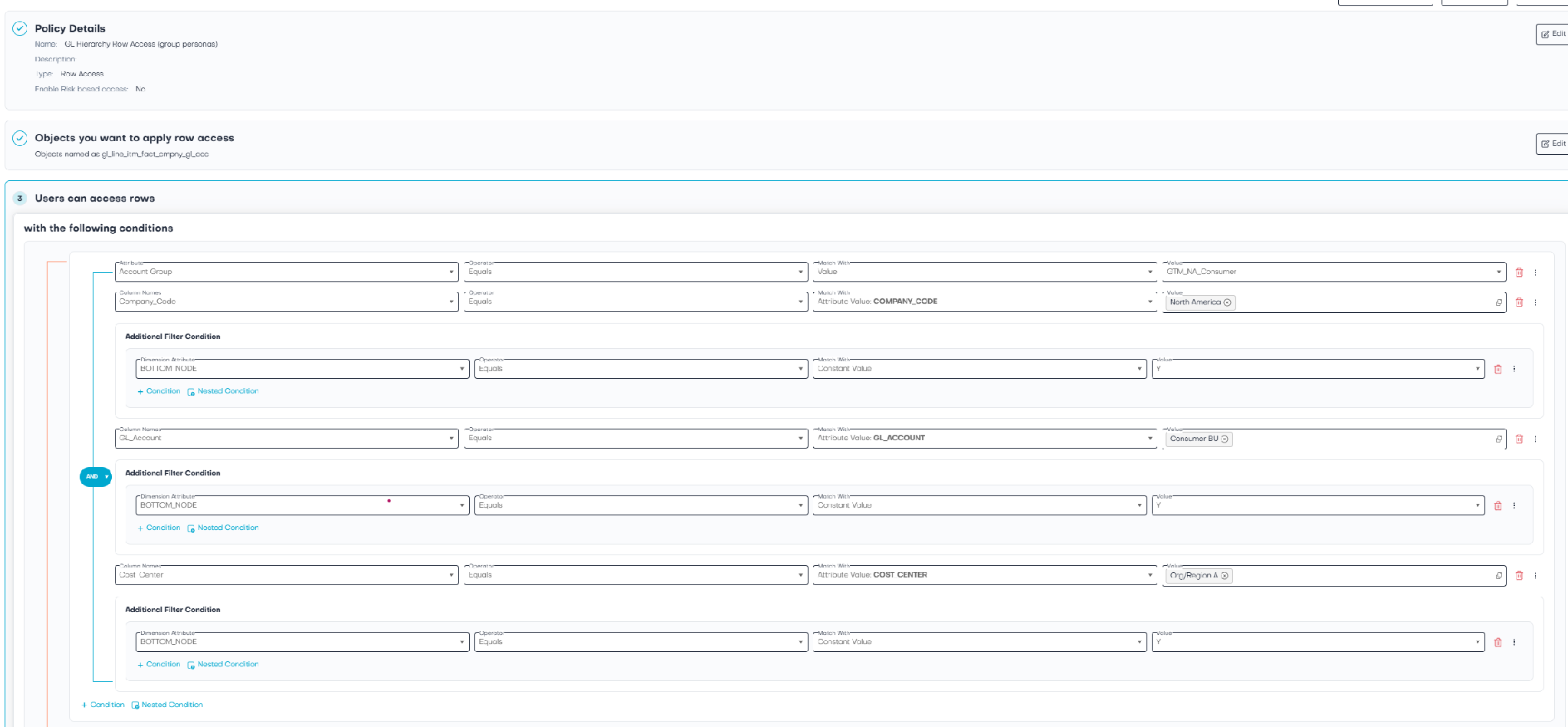
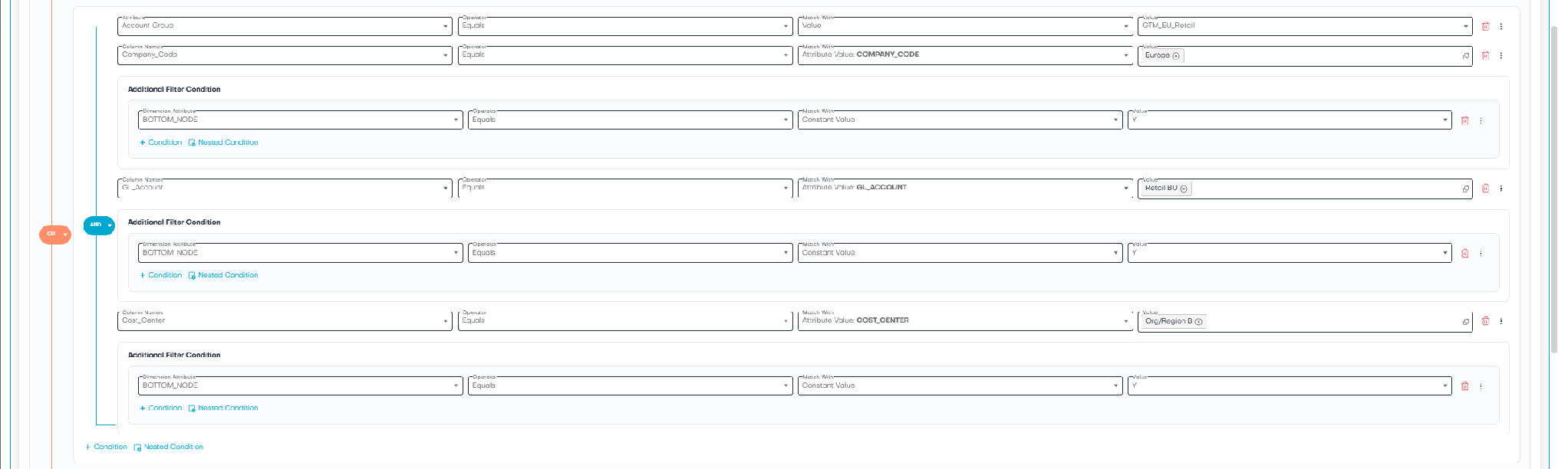
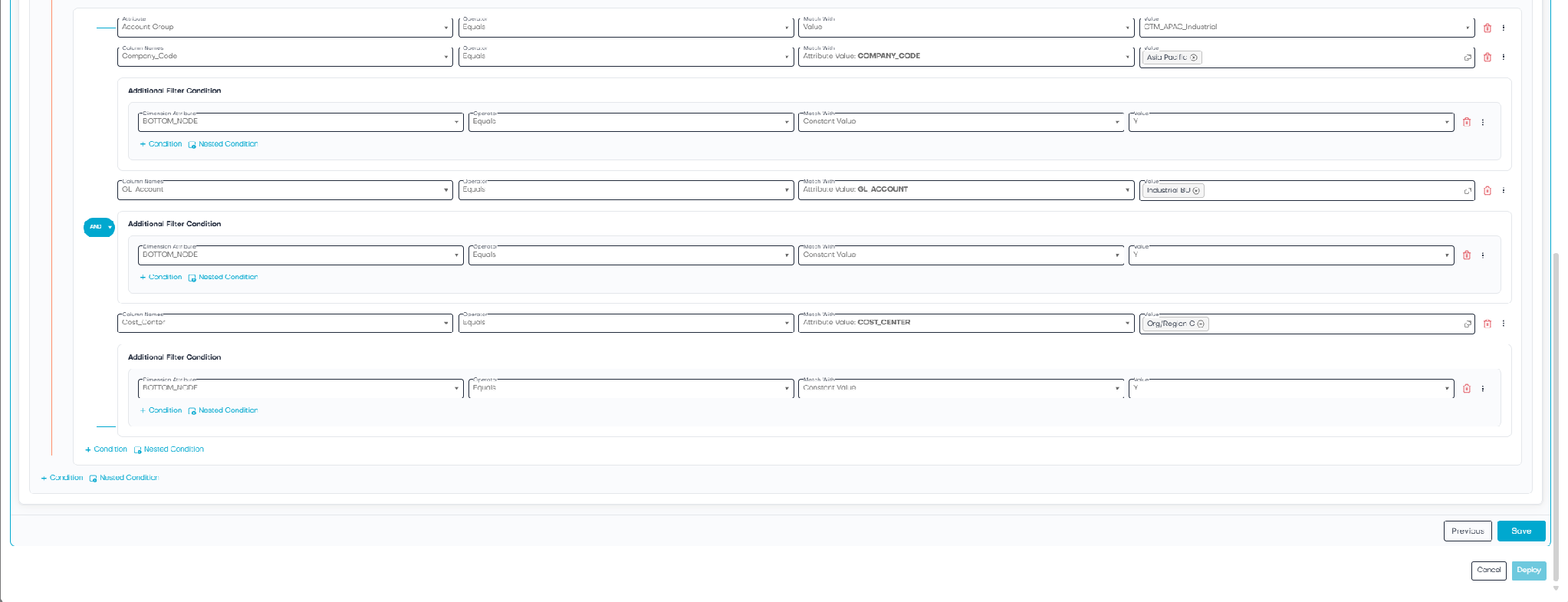
This one policy is what the agent, the dashboard, and the custom app all hit. There is no second copy to keep in sync.
The reorg moment
Let’s someone changes a person's entitlement due to a re-org, in this demo, by moving them between persona groups by changing their Databricks group in this example (e.g. North America Consumer to Asia-Pacific Industrial). You don't touch the dashboard. You don't touch the agent. You don't touch the app or rewrite a query.
The next time each surface runs, the policy re-evaluates against the new entitlement, and all three re-scope themselves: the agent's totals change, the dashboard's bars redraw to the new region, the app's tree re-lights to the new branch. One change, enforced everywhere, automatically.
(Screenshot from TrustLogix demo app)
AI Agent
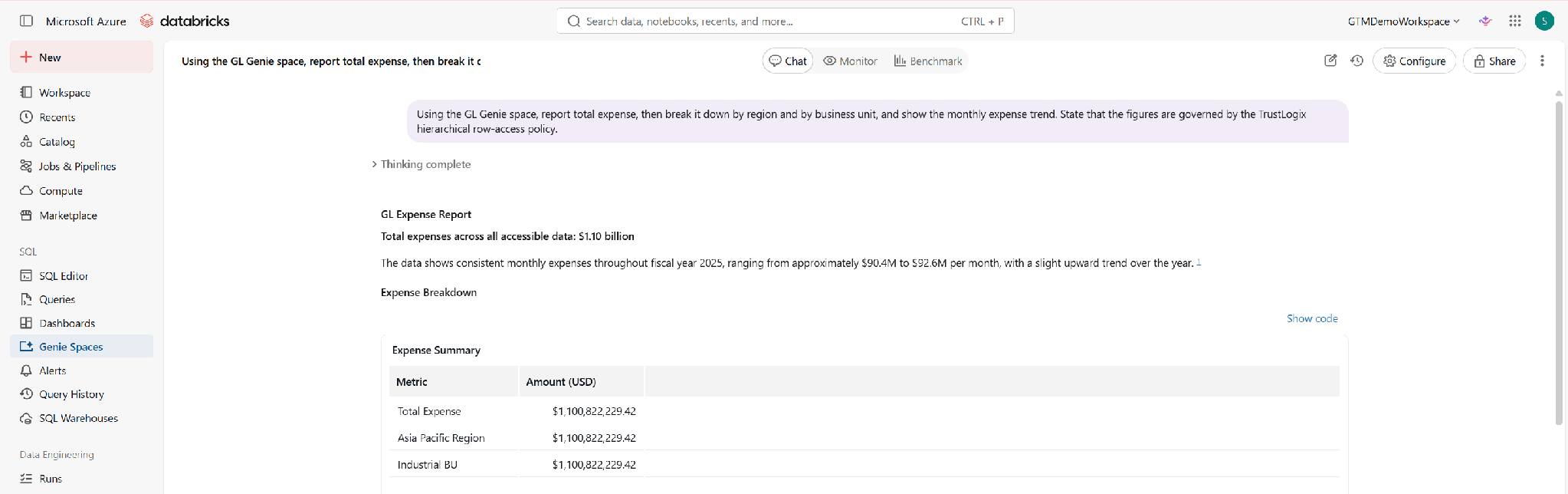
BI Dashboard
Custom App
What this actually saves you
No per-tool policy copies. You author the hierarchy and entitlements once. The BI tool, the AI agent, the app, and raw SQL all enforce the same policy not four interpretations of it that slowly diverge.
Reorgs become trivial. Move a person or re-parent a node; every consumption surface follows automatically. No change-ticket fan-out across teams that each own a different tool.
One audit surface. When someone asks "why can this user see this row?", there's a single policy and a single entitlement to point at and the app literally traces it on screen.
Provable least-privilege, including for AI. The agent doesn't get sensitive rows and then "decide" to withhold them. The rows are filtered before they ever reach the model. Your AI inherits your data governance for free.
Grant nodes, not lists. Entitlements track your org chart "Europe," "Apparel," "the North America footwear branch" instead of brittle entitlements that you have to rebuild every time the tree changes.
Hierarchical access is how the business actually thinks about who-sees-what. TrustLogix lets you express it once, and then enforces it identically across every tool that touches the data, including the AI agents you're racing to deploy.
Define access once. Enforce it everywhere.
Want to see it live? Ask us for a walkthrough of the hierarchical GL demo - the agent, the dashboard, and the access map, all governed by a single policy, with a live reorg in the middle.
Stay in the Know
Subscribe to Our Blog


.png)
.png)