


As enterprises modernize their data ecosystems to support advanced analytics and AI, they are rapidly scaling their use of Databricks, Snowflake, Power BI, and Tableau. This expansion raises a pressing requirement: an access governance model that is scalable, consistent, and continuous across the entire lifecycle. As datasets, domains, and downstream consumers multiply, manual reviews and platform-specific controls can no longer keep pace or maintain protection from data source to dashboard.
Our earlier article also highlighted why traditional governance models break down in these expanding data ecosystems. In this blog, we’ll discuss how organizations can begin to build lifecycle-aware governance that keeps security aligned with the pace of data product deployment.
Organizations should adopt the following practices to extend consistency, speed, and resilience across every stage of the data product lifecycle.
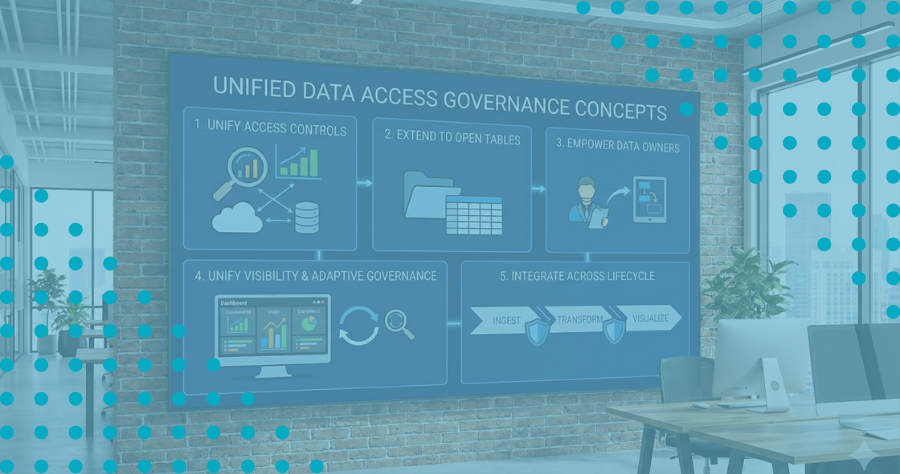
1. Unify Data Access Controls Across Platforms
In Databricks and Snowflake, workspace-level fragmentation has largely been solved—Unity Catalog and centralized Snowflake access governance allow policies to be consistently applied across workspaces within the same platform. However, the problem reappears the moment data moves across platforms: as datasets flow from Databricks into Snowflake, or into business intelligence tools like Power BI and Tableau, access policies don’t follow the data, forcing teams to manually recreate access controls—slowing delivery and increasing risk.
Organizations should address this challenge by building unified data access controls that span platforms and environments. By centrally managing these controls for consistency and compliance—and deploying them natively within each system, whether Databricks, Snowflake, or downstream tools like Power BI and Tableau—they can maintain performance while enforcing policies where the data actually resides.
With this unified model, policies travel with the data throughout its lifecycle—from ingestion to transformation to visualization—ensuring consistent, least-privilege access and protection wherever the data is used.
2. Extend Data Access Governance to Open Table Formats
As enterprises increasingly adopt open table formats—especially Apache Iceberg—the access governance challenge expands beyond cloud data workspaces. Iceberg enables data products to be shared across multiple engines such as Spark, Trino, Snowflake (via Polaris), and AI/ML pipelines running directly on the data lake. But while Iceberg standardizes table metadata, it does not unify access controls across compute platforms.
Without a consistent access governance layer, policies must be recreated for each engine that queries the same Iceberg table—reintroducing the same fragmentation that slows delivery and increases risk.
A scalable access governance model extends policies directly to the storage layer where Iceberg tables reside. By applying access controls natively in Amazon S3, Azure Data Lake Storage, or Google Cloud Storage—and enforcing them consistently regardless of the downstream engine—organizations ensure that data products remain protected whether they are queried by Databricks, Snowflake Polaris, Trino, or an AI agent retrieving features at runtime.
This approach allows Iceberg to deliver on its promise of openness and interoperability, while keeping access governance centralized, consistent, and fully aligned with enterprise policy.
3. Empower Data Owners Through No-Code Data Access Governance
Another challenge is the gap between who understands the data and who can implement the policies. Traditional approaches require engineers to translate business rules into complex platform-specific scripts, keeping policy implementation bottlenecked inside engineering.
A more scalable model shifts access control closer to the business with no-code or low-code policy management, enabling data owners and product teams to define who should have access and under what conditions.
This democratizes control, reduces engineering bottlenecks, and lets new data products move into production faster.
4. Unify Visibility and Enable Adaptive Data Access Governance
As organizations scale across Databricks workspaces, Snowflake accounts, and downstream tools such as Power BI or Tableau, visibility often fragments. Audit teams struggle to answer basic questions: Who has access? What are they using? Is it compliant?
The emerging best practice is to maintain a unified entitlement and usage view of who has access to what data, how that access was granted, and how it’s actually being used.
In this best practice, automated monitoring continuously compares intended policy against real-world behavior, detecting policy drift when permissions no longer align with usage or business need. These insights feed back into policy management, guiding automated adjustments that right-size access, remove unused privileges, and strengthen compliance over time.
With this continuous feedback loop, data access governance becomes adaptive, and audits shift from reactive checkpoints to ongoing assurance.
5. Integrate Data Access Governance Across the Data Product Lifecycle
Enterprise data products evolve constantly: new sources are onboarded, schemas change, AI models are retrained, and business units request additional attributes. Security must evolve just as fluidly.
By embedding access governance directly into data-product workflows from ingestion and enrichment through transformation, sharing, and visualization, organizations achieve access governance continuity.
Controls remain consistent even as products move between Databricks and Snowflake environments, or feed analytics tools such as Power BI and Tableau. This end-to-end integration closes the gaps that typically appear when data crosses systems.
The Bottom Line
When access controls, visibility, and compliance are unified, operational efficiency improves dramatically. Manual reviews shrink from weeks to minutes, developers reclaim time for higher-value work, and compliance teams gain confidence that every new data product is protected correctly from the start. Organizations adopting automated access governance approaches often report 40–60 percent reductions in time and cost for onboarding and securing new data products with even greater gains as automation matures.
Enterprises shouldn’t have to choose between innovation and control. A data-centric access governance model makes it possible to support both priorities by ensuring that security is automated, continuous, and embedded across Databricks, Snowflake, and the broader analytics ecosystem. With this foundation in place, organizations can scale data products faster, safer, and with lasting confidence.
This is the path to true lifecycle security: consistent policies, unified visibility, and continuous compliance from source to dashboard, no matter where the data lives.
Stay in the Know
Subscribe to Our Blog

.png)
.png)